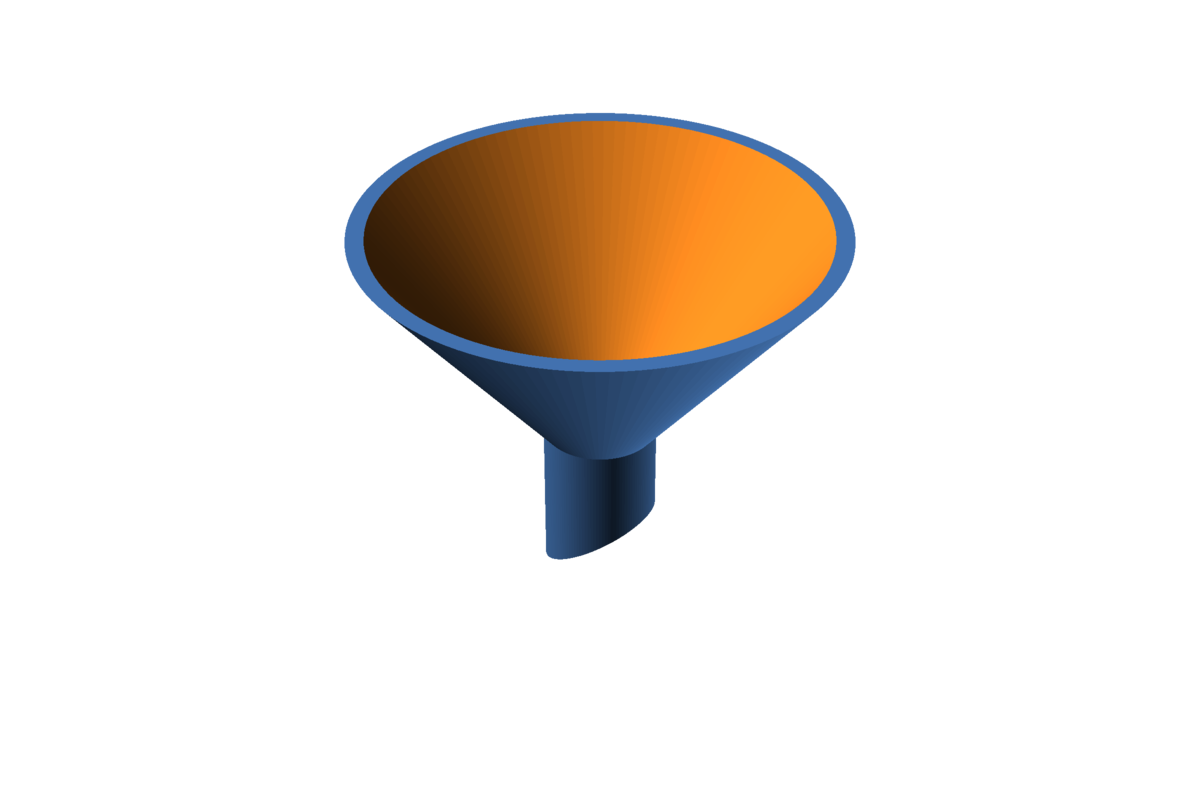
Here is a fact nobody tells you when you get into building RC planes: you will need funnels. Lots of them. Big ones, small ones, wide ones, narrow ones, thick-walled ones and the flimsy kind you don’t feel bad about. The hobby has an apparently endless appetite for pouring things from one container into another.
Some of these funnels survive and get reused. Others don’t. Pour epoxy through a funnel once and you’ll learn very quickly that it’s now a single-use funnel, preferably used right before it becomes a paperweight. Epoxy is great at many things. Letting go is not one of them.
And it doesn’t stop at the workshop door. The car needs something topped up, the kitchen has some container that’s slightly too narrow, the household always finds something that needs to go from here into there without ending up on the floor.
So at some point I stopped hunting for the “right” funnel and designed my own, in OpenSCAD of course. If you’ve read My road to OpenSCAD, you already know why: I want to stay flexible. Not one funnel, but a funnel generator. Change a few numbers, get a new funnel.
The parameters
Everything you can tweak sits in the header of the file. The comments in the source are in German (sorry, it’s my workshop and my native language), but the variable names are in English, and I’m fairly confident you’ll figure them out. Here’s the translated version:
// ==== Parameters ====
outlet_id = 10;    // Inner diameter at the bottom (outlet bore), max. 12.5 mm
wall      = 1.2;   // Wall thickness (radial), min. 1 mm required -> 1.2 mm for safety margin
spout_h   = 10;    // Length of the SHORT side of the spout, 10-20 mm allowed
bevel_len = 8;     // Extra length of the LONG side -> amount of one-sided bevel (0 = straight cut)
open_id   = 50;    // Inner diameter at the top (opening)
cone_h    = 25;    // Height of the flaring cone section
$fn       = 120;   // Curve resolution (number of facets)
In plain words:
outlet_idis the hole at the bottom. Small for precise pouring, bigger if you’re impatient or the liquid is thick.wallis how sturdy the funnel is. 1.2 mm is a nice balance between “survives being dropped” and “doesn’t eat a whole spool”.spout_handbevel_lenshape the spout. The bottom end is cut at an angle, so one side is longer than the other. That makes it easier to fit the funnel into an opening and lets air escape while the liquid goes down. Setbevel_len = 0if you prefer a boring straight cut.open_idandcone_hdefine the big end: how wide the opening is and how steep the cone gets.$fncontrols how round round things are. 120 is plenty. Crank it up if you enjoy watching the render progress bar.
Making your own funnel
You can open the file in the OpenSCAD UI, change the values and export an STL. Or, the way I usually do it, skip the UI altogether and override the parameters on the command line:
openscad -o funnel_wide.stl \
  -D 'open_id=80' \
  -D 'cone_h=35' \
  -D 'bevel_len=0' \
  Trichter.scad
Anything you don’t pass keeps its default from the file. One file, infinite funnels. Well, at least as many as my printer bed allows.
The construction itself is about as simple as OpenSCAD gets: a tube for the spout, a hollow cone on top of it, and a big tilted block that slices the bottom end off at an angle. That’s it. No magic, about 50 lines of code.
Download
The source file is free to use under CC BY 4.0. Print it, remix it, pour epoxy through it. Just don’t come back and tell me you should have printed two.
